From a request to a rated job
Qlean works like a small marketplace: you describe the job, cleaners nearby make offers, and you stay in control at every step.
Booking a cleaning
-
Describe the job
The booking wizard asks for the service type, property type, area, rooms, any specific tasks, a date and time, the address pinned on a map, photos of the space and your budget. Your draft is saved as you go.

-
Receive offers
Cleaners near you review the request and reply with their own price and an optional note. You can see who has responded and open their profile.

-
Accept and chat
Accept the offer you prefer and the order is locked to that cleaner. A chat for the booking opens so you can coordinate details.

-
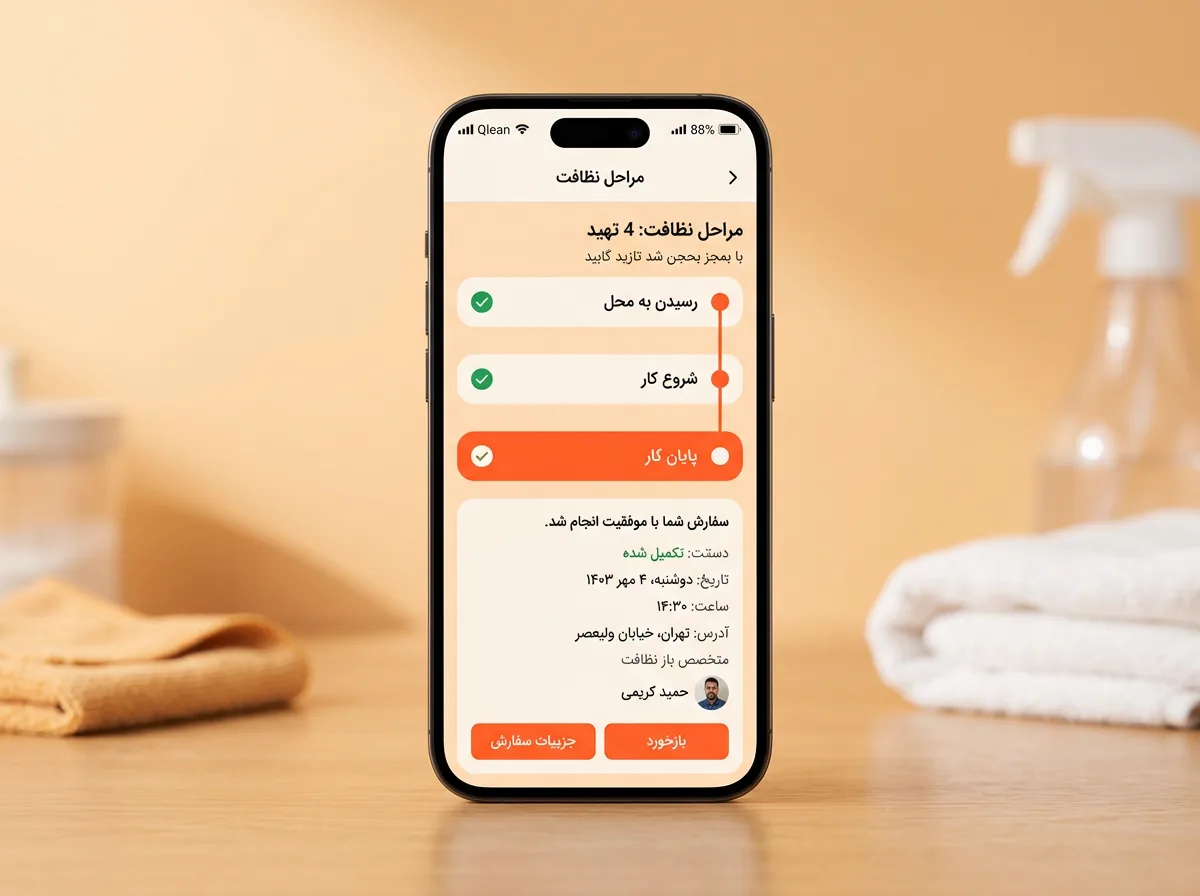
Follow the job
The cleaner marks when they have arrived, started and finished, and you are notified at each point.
-
Confirm and rate
Confirm the work, or send it back to the cleaner if it is not right. Then rate your cleaner and leave a comment if you like.

You can change your mind
-
Drafts are saved
Leave the booking wizard and come back; your draft is waiting, or you can start over.
-
Requests can expire
If no one takes up the order in time it expires, and you can submit a new request.
-
Cancel with a reason
Either side can cancel an order. The other person is notified with the reason you give.
Ready to book your first clean?
Describe the job, get offers from cleaners near you, and choose the one you like.